

🌐 Circuit Switching vs Packet Switching | CN#6
In earlier posts, we covered network devices. Now let’s understand two fundamental techniques for data transfer in networks: Circuit Switching and Packet Switching.
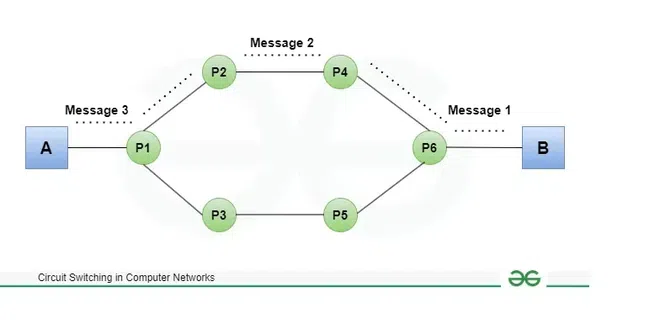
🔹 Circuit Switching
📌 Key Points
Works at the Physical Layer.
Uses a dedicated path between sender and receiver.
Data flows in a continuous stream (like a phone call).
No headers are needed in the middle of transmission.
Less efficient (path stays reserved even if no data is being sent).
Delay is low once the path is set.
Total Time Formula:
Total Time=Setup Time+Transmission Time+Propagation Delay+Tear Down Time
🌍 Real-world Example
Think of a traditional landline call 📞: before speaking, a line is dedicated between two phones. Nobody else can use that line until the call ends.
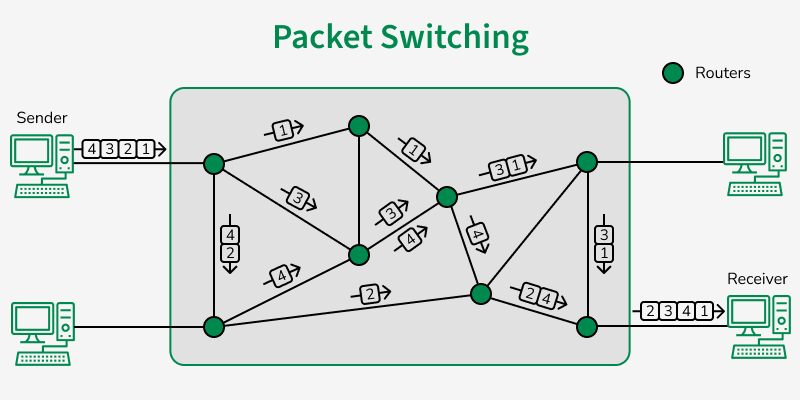
🔹 Packet Switching
📌 Key Points
Works at the Data Link and Network Layers.
Uses store and forward technique.
Data is broken into packets with headers (address info).
Supports pipelining (multiple packets move at once).
Efficiency is high (path is shared among many users).
Delay is higher (due to processing at each router).
Total Time Formula:
Total Time=Transmission Time+Propagation Delay
🌍 Real-world Example
Think of sending a WhatsApp message 💬: it’s broken into small packets. Each packet may travel through different routes, but eventually they all reach the receiver and get reassembled.
🕒 Transmission vs Propagation Delay
1️⃣ Transmission Delay (or Transmission Time)
Definition:
The time required to push all the bits of a packet onto the wire (medium) from the sender.
Think of it as how long it takes to "load" the data onto the network link.Formula:
Ttransmission=Packet Size (in bits)/Link Bandwidth (in bps)
Key Factors:
Packet size: Bigger packet → more bits → longer time.
Bandwidth: Higher bandwidth → faster transmission.
Analogy:
Imagine a water pipe with limited width. Transmission delay is like the time it takes to pour a full bucket of water into the pipe at the pipe’s maximum rate.Example:
Packet size = 1 MB = 8,000,000 bits
Link bandwidth = 1 Mbps = 1,000,000 bps
Ttransmission=8,000,0001,000,000=8 seconds
So it takes 8 seconds just to put the packet on the link.
2️⃣ Propagation Delay
Definition:
The time it takes for a single bit (once transmitted) to travel from sender to receiver over the physical medium.Formula:
Tpropagation=Distance/Propagation Speed
Key Factors:
Distance: Longer cables → longer delay.
Medium speed: Depends on the medium (fiber ≈ 2 × 10⁸ m/s, copper ≈ 2.3 × 10⁸ m/s, wireless ≈ 3 × 10⁸ m/s).
Analogy:
Once you pour water into the pipe, propagation delay is the time the first drop of water takes to travel to the other end.Example:
Distance = 1000 km = 1,000,000 meters
Propagation speed in fiber ≈ 200,000 km/s = 2 × 10⁸ m/s
propagation=1,000,000/2×10^8=0.005 sec=5 ms
So the first bit reaches in 5 ms, regardless of packet size.
📊 Comparison Table
| Feature | Circuit Switching | Packet Switching |
| Layer | Physical Layer | Data Link & Network Layers |
| Path | Dedicated (reserved) | Dynamic (packets choose routes) |
| Flow | Continuous | Store & forward (packets) |
| Headers | Not needed | Required |
| Efficiency | Low | High |
| Delay | Low (after setup) | Higher |
| Formula (Total T) | Setup + Tx + Prop + Teardown | Tx + Prop |
| Real Example | Telephone Call | WhatsApp / Email |
🧵 Follow the entire CN series to master networking step-by-step.
Comments
Join the discussionNo comments yet. Be the first to comment.


